> Agents can also search and read this documentation through its [MCP server](https://docs.7k.ag/~gitbook/mcp).

# Quickstart

Dive Right Into 7K Aggregator!

<table data-view="cards"><thead><tr><th></th><th></th><th></th><th data-hidden data-card-target data-type="content-ref"></th><th data-hidden data-card-cover data-type="files"></th></tr></thead><tbody><tr><td><strong>User Guides</strong></td><td></td><td></td><td><a href="https://docs.7k.ag/7k-aggregator/guides-for-7k-aggregator">Guides for 7K Aggregator</a></td><td><a href="https://2380703610-files.gitbook.io/~/files/v0/b/gitbook-x-prod.appspot.com/o/spaces%2Fy7rOL9uvLN542fZi4a7q%2Fuploads%2FTzE2yn9p2L3NQIBJ9MyH%2Fguide.jpeg?alt=media&amp;token=f7ef3f81-f4ce-49be-a3d4-9fab9a6c6171">guide.jpeg</a></td></tr><tr><td><strong>Integrate 7K Aggregator To Your Exchange</strong></td><td></td><td></td><td><a href="https://docs.7k.ag/7k-aggregator/integration">Integration</a></td><td><a href="https://2380703610-files.gitbook.io/~/files/v0/b/gitbook-x-prod.appspot.com/o/spaces%2Fy7rOL9uvLN542fZi4a7q%2Fuploads%2FhdoxVGKz51uQaiYbYQGh%2Fintegrate.jpeg?alt=media&amp;token=9c949c01-ab41-4328-a720-56588467fdf4">integrate.jpeg</a></td></tr><tr><td><strong>Business Inquiries &#x26; User Support</strong></td><td></td><td></td><td><a href="broken://pages/kyFmWWEO3fEfoQIyufsr">Broken link</a></td><td><a href="https://2380703610-files.gitbook.io/~/files/v0/b/gitbook-x-prod.appspot.com/o/spaces%2Fy7rOL9uvLN542fZi4a7q%2Fuploads%2F6JuydC74jPoKQ64kLfS7%2Fbusiness.jpeg?alt=media&amp;token=dca3580d-d87c-4702-9dc9-eea450fe0c15">business.jpeg</a></td></tr></tbody></table>


# Welcome to 7K

First Dynamic Routing Aggregator on Sui

## What is 7K?

* The name "7K" reflects the character **水** (water), aligning with the theme of the Sui blockchain.
* Our goal is to integrate deeply with Sui to enhance and enrich its growing ecosystem. As the pioneering dynamic trading route aggregator on Sui, **7K Aggregator** is designed to optimize your trading strategies.

## What makes 7K different?

### Optimized Synchronizing Speed

Thanks to our advanced data infrastructure, we can synchronize blockchain data significantly faster than typical PRC updates. As a result, users see amounts in the UI that are more accurate and up-to-date. This improvement minimizes transaction failures due to slippage.

### **Dynamic Trade Routing**

Our dynamic trade routing system distributes input token amounts across multiple paths to secure the best possible prices. Users can view the DEXs involved in the trade and the percentage splits among them, ensuring optimal outcomes.

### **Automatic Market Listing**

**7K Aggregator** automatically includes new pools with a Total Value Locked (TVL) greater than $500 from supported exchanges. This feature enhances your swapping experience by eliminating the need to manually search and trade on each exchange.

### Gas Saving

Using advanced algorithms, **7K Aggregator** manages to offer better rates with less route splitting, thereby reducing the total gas cost for users.

## 7K DeFi Roadmap

Full article: <https://x.com/7k_ag_/status/1936015549504647370>

2025 Q3

* LP Pro - Mainnet
* LP Pro - Automation
* 7K Spot DEX - Mainnet

2025 Q4

* LP Pro - Advanced Analytics
* LP Pro - Auto-invest with Customized Strategies
* LP Pro - Trading Data Analytics
* 7K Spot DEX - Community Liquidity Provision (Phase 2)

2026 H1

* LP Pro - Leveraged LPing
* LP Pro - Backtesting Tools
* 7K DEX - Perps/Margin Trading (Phase 3)
* Project TGE


# Overview

Bridging Fragmented Liquidity Across DEXs

As the premier aggregator on Sui, **7K Aggregator** optimizes trade paths across AMM, CLMM, and Order Book DEXs, ensuring the most efficient liquidity sources. This approach guarantees favorable swap rates and strengthens market stability. With **advanced data infrastructure and algorithm**, **7K Aggregator** ensures optimal execution, offering the best prices, minimal slippage, and low gas fees, thereby enhancing the growth of the Sui ecosystem.

<figure><img src="https://2380703610-files.gitbook.io/~/files/v0/b/gitbook-x-prod.appspot.com/o/spaces%2Fy7rOL9uvLN542fZi4a7q%2Fuploads%2Fdb12Cas3FugL6G3nlljR%2F7K_Onepager%20(1).png?alt=media&amp;token=3ff8d015-07a9-46a8-96ff-9c5a347e6da1" alt=""><figcaption></figcaption></figure>


# Dynamic Trade Routing

Secure The Best Rates For Your Trades

In a DEX, swapping a large quantity of *Token A* for *Token B* along a single path often leads to a proportional increase in the price of *Token B* due to decreased liquidity. **Dynamic Trade Routing** mitigates this by distributing the large token amount into smaller segments and executing swaps across various paths. This strategy minimizes the impact on *Token B*'s price.

**7K Aggregator** has **Dynamic Trade Routing**, aggregating fractured liquidity across DEXs, enabling users to source the most capital-efficient liquidity to support their trades.

> For example, if you want to make a 1000 USDC-SUI trade, it may distribute your trade into a 950 USDC-SUI trade on DEX\_1, 30 USDC-SUI trade on DEX2, and the rest on the third route to ensure the combined outcomes are optimal for the trade.

The percentage distribution of each swap is dynamically calculated to secure the best possible price. Trade splitting is particularly effective for large transactions and for trades involving tokens with scattered shallow liquidity across multiple exchanges. This approach not only improves pricing but also allows you to see precisely which DEXs are involved and how the amounts are distributed among them.


# Supported Exchanges

Exchanges Added To Our Routes

We integrate these exchanges into our aggregator, aiming to extend the liquidity sources and execute swaps at the best rates.

### DEXs

* Aftermath Finance
* Bluefin
* BlueMove DEX
* Cetus
* DeepBook
* DeepBook V3
* FlowX Finance
* FlowX Finance V3
* Haedal PMM
* Kirya V3
* Magna
* Momentum
* MovePump
* Obric
* Steamm
* Steamm Oracle Quoter
* SuiSwap
* Turbos Finance

### Others <a href="#user-content-others" id="user-content-others"></a>

* SpringSui
* stSUI
* BluefinX


# Guides for 7K Aggregator

Simple Step-by-step Tutorials

## **Swap**

**Step 1:** Connect your wallet

<figure><img src="https://2380703610-files.gitbook.io/~/files/v0/b/gitbook-x-prod.appspot.com/o/spaces%2Fy7rOL9uvLN542fZi4a7q%2Fuploads%2FbZIN08za8fPUCRteDz3s%2Fimage.png?alt=media&amp;token=e8d04e72-eaa6-421e-a4f0-9fcf86f67662" alt=""><figcaption></figcaption></figure>

**Step 2:** Choose the asset and input the amount you want to swap

<figure><img src="https://2380703610-files.gitbook.io/~/files/v0/b/gitbook-x-prod.appspot.com/o/spaces%2Fy7rOL9uvLN542fZi4a7q%2Fuploads%2F5O21tQq3tZiE0HzA3mN9%2Fimage.png?alt=media&amp;token=26f6fdf3-0e5b-47e2-aaa1-817ef085394f" alt=""><figcaption></figcaption></figure>

**Step 3:** Swap your asset with an optimized cost by **7K Aggregator**

<figure><img src="https://2380703610-files.gitbook.io/~/files/v0/b/gitbook-x-prod.appspot.com/o/spaces%2Fy7rOL9uvLN542fZi4a7q%2Fuploads%2FlCoWKsR3783OC7Fce3rR%2Fimage.png?alt=media&amp;token=4aa38b2d-2271-4c83-af30-1b9de5628dba" alt=""><figcaption></figcaption></figure>

## Search Tokens

**Step 1:** Click on the token box as shown below

\
**Step 2:** Input the token name which you want to trade and choose the token you are looking for.&#x20;

## Swap Details

<figure><img src="https://2380703610-files.gitbook.io/~/files/v0/b/gitbook-x-prod.appspot.com/o/spaces%2Fy7rOL9uvLN542fZi4a7q%2Fuploads%2FpVqpWW6sbyJn0lRRLXtt%2Fimage.png?alt=media&amp;token=e761c04e-d27a-4936-a0bf-9467c17286b2" alt=""><figcaption></figcaption></figure>

* Fees: The amount paid to liquidity providers of the pools.
* Price Impact: Trading shifts the ratio of tokens in the pool, affecting the price per token.
* Minimum Received: The minimum amount you’ll receive after deducting fees and accounting for maximum slippage.
* Slippage Tolerance: Adjustable in settings, this ensures you either get the amount you want or the transaction will be canceled.


# Integration

Extend The 7K Waves Across Sui Ecosystem

## Integrators

We welcome everyone interested in integrating our Aggregator, but we do have a few guidelines:

* Users must acknowledge the use of the **7K Aggregator API**. For example, mention us in your announcements of new features and applications.
* Including a phrase like "**Powered by 7K Aggregator**" in the integrator's UI is highly appreciated.
* Please refrain from modifying the **7K Aggregator** **smart** **contract**, whether within the SDK or elsewhere.
* **7K Aggregator** reserves the right to withhold support from parties engaging in unethical practices.

## DEXs

Please direct [contact](https://7k.ag/collab) us for business inquiries regarding integration of your DEX pools/markets.

## UI Provider

**7K SDK** provides developers with an SDK to integrate our aggregator.&#x20;

Visit this [page](https://docs.7k.ag/developers/sdk) for more information.

## Integrating Fees

There are no protocol fees for the 7K Aggregator or platform fees on the 7K UI. However, UI providers may implement their own platform fees, with a maximum of **5%** of the token output. If a platform fee is established, 7K will take **20%** of the fees charged by integrators.

[<br>](https://docs.ashswap.io/aggregator/swap-guide)


# Verification request

To get started, simply follow the link below and fill out the verification request form. Make sure to provide accurate and complete information to ensure a smooth review process.

\
👉 **Submit your request here:** [7k.ag/verificationrequest](https://7k.ag/verificationrequest)

Our team will review your submission as soon as possible and reach out with the next steps. Thank you for helping us build a trusted and reliable ecosystem!<br>


# About LP Pro

LP Pro makes liquidity providing on Sui simple, transparent, and efficient.

**LP Pro** is an all-in-one solution for Sui liquidity providers. It brings every major Sui DEX into a single, easy-to-use platform, so you can deposit, track, and manage your positions with confidence.

## **What LP Pro Solves**

* **Fragmented UX:** No more jumping between different DEXs and confusing pool layouts—LP Pro unifies the experience.
* **Blind PnL:** Instantly see your real-time PnL, impermanent loss, and APR to help you make better decisions.
* **Limited Discovery:** Explore higher-yield opportunities and smart LP strategies—all in one place.

{% embed url="<https://www.youtube.com/watch?v=bVjj0VHhUuA>" %}

## 7K LP Pro: What We Deliver <a href="#f063" id="f063"></a>

More than a dashboard, 7K LP Pro functions like a full-stack liquidity engine.

### 1. One-Stop LP Hub <a href="#bb70" id="bb70"></a>

With 7K LP Pro, every major Sui DEX is brought under one roof. No more jumping between interfaces or juggling wallets: **users can deposit, track, rebalance, or exit positions across protocols in a single click**.

7K LP Pro becomes your central command center for capital deployment and optimization.

### 2. Transparent, Granular PnL <a href="#id-2ccd" id="id-2ccd"></a>

Forget generic APRs and guesswork: 7K LP Pro provides **real-time visibility into fee earnings, impermanent loss, and net yield**, with historical performance charts and position-level detail.

This **advanced PnL dashboard** translates on-chain data into actionable insights, helping LPs move from “set and forget” to “measure and manage.”

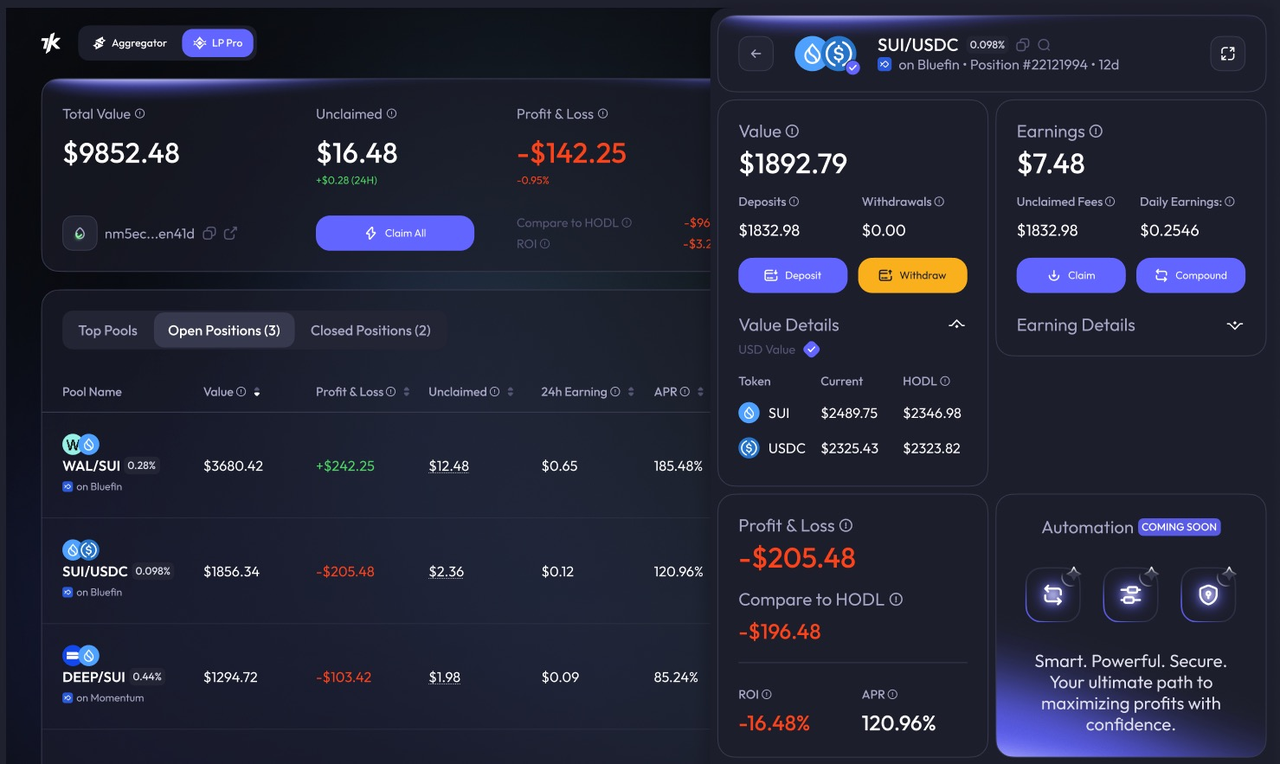
<figure><img src="https://miro.medium.com/v2/resize:fit:1400/1*kwbmTJqiTNqKPim86kAw3Q.png" alt="" height="418" width="700"><figcaption><p><a href="https://x.com/7k_ag_/status/1940062887776854392"><em>View your PnL and everything else,</em></a> <em>all on 7K LP Pro</em></p></figcaption></figure>

Don’t fly blind.

### 3. One-Click Rebalance & Zap <a href="#a648" id="a648"></a>

Move funds between volatile and stable pools in a single tap. Whether splitting liquidity, rebalancing risk, or seizing a temporary yield spike, 7K LP Pro’s Zap engine automates the routing and compressing of what once took 5 steps into one.

Maximum capital efficiency and minimum mental load for you.

### 4. Sticky UX That Converts Attention into Revenue <a href="#e5ae" id="e5ae"></a>

7K LP Pro doesn’t just optimize capital, but also **monetizes user attention.** It’s a perspicacious UX layer that creates surface area for discovery, experimentation, and retention.

Press enter or click to view image in full size

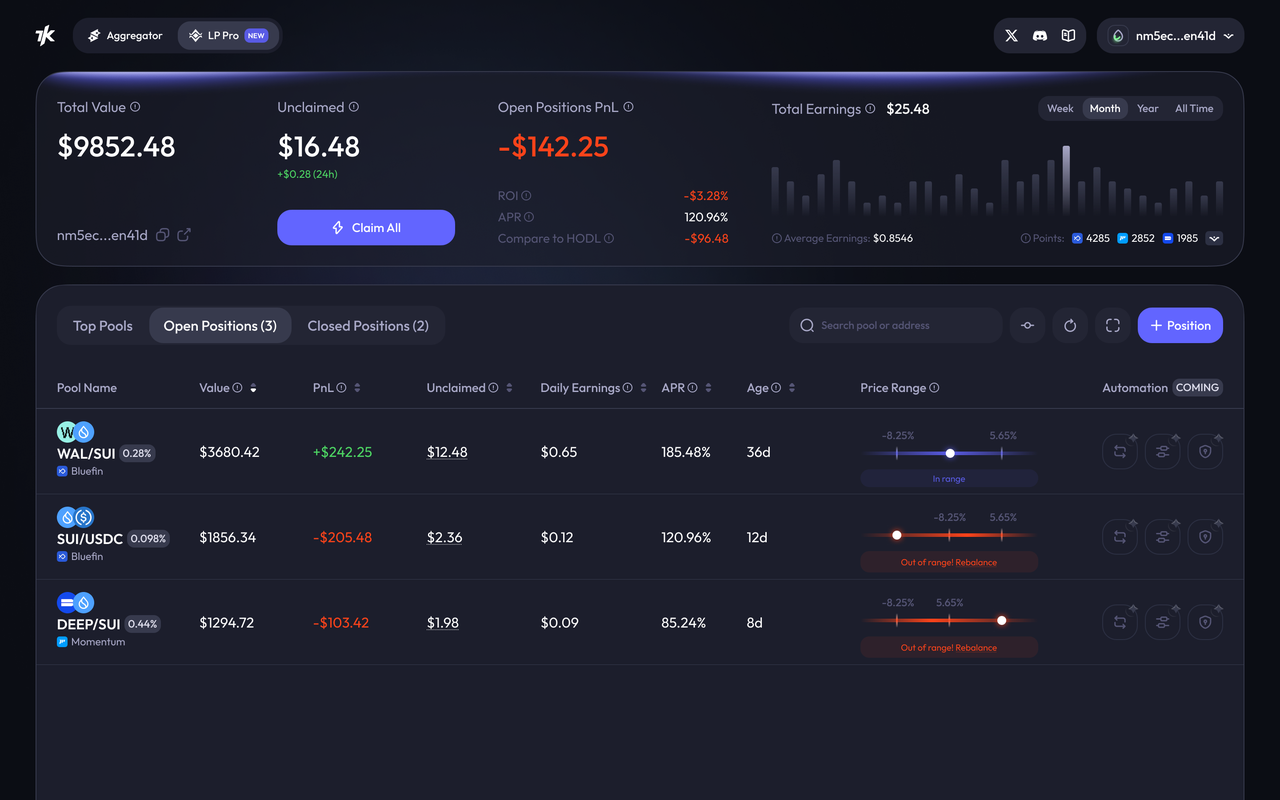
<figure><img src="https://miro.medium.com/v2/resize:fit:1400/1*1lISTk48BXJempxBQS8JGg.png" alt="" height="438" width="700"><figcaption><p>7K LP Pro Dashboard Table Overview</p></figcaption></figure>

Full description about LP Pro can be found here: <https://medium.com/@7k_ag_/7k-lp-pro-your-cross-dex-lp-aggregator-with-in-depth-yield-analytics-a4610bd059c6>

## 7K LP Pro Roadmap

#### August 2025

* Cetus pools support
* Mobile responsive UI
* Referral for LP Pro
* Public Dashboard with feature metrics
* Highlight tags for top pools, strategic partner pools

#### Sept 2025

LP Pro v2 with Automation

* Automated Rebalance
* Automated Claim
* Automated Compound
* Automated Exit
* More DEX Support (Turbos, FlowX, Magma...)

#### Q4 2025

* Aggregate Yield Vaults from DeFi partners on Sui: Haedal, AlphaFi, Magma, NODO...
* Looping/Leveraged Lending
* Permissionless Automated Strategies/Vaults


# Guides for 7K LP Pro

Simple Step-by-step Tutorials

{% hint style="info" %}
LP Pro URL: [https://7k.ag/lp/](https://7k.ag/lp/?utm_source=docs\&utm_medium=link\&utm_campaign=system)
{% endhint %}

## **Create LP Position**

**Step 1:** Choose a pool in the pool list that you want to, LP Pro is supporting multiple DEXs across Sui Network

<figure><img src="https://2380703610-files.gitbook.io/~/files/v0/b/gitbook-x-prod.appspot.com/o/spaces%2Fy7rOL9uvLN542fZi4a7q%2Fuploads%2FZJURTG3P6OqtMkKuSgfl%2FScreenshot%202025-07-29%20at%2012.02.31.png?alt=media&amp;token=35c3e106-e320-4610-9577-322682ed98f8" alt=""><figcaption></figcaption></figure>

If you created other positions on supported DEXs, your position will also be displayed on LP Pro

**Step 2:** Choose your token ratio range

<figure><img src="https://2380703610-files.gitbook.io/~/files/v0/b/gitbook-x-prod.appspot.com/o/spaces%2Fy7rOL9uvLN542fZi4a7q%2Fuploads%2Fr8IASnNgrGYnLW3YEcRW%2FScreenshot%202025-07-29%20at%2012.04.23%20copy.png?alt=media&amp;token=d48f91e4-cf6c-4f0c-93f0-560bd7ff5421" alt=""><figcaption></figcaption></figure>

With Uniswap-v3-model DEXs, you will be able to choose the liquidity range for providing token in order to maximize your outcome, you can click and drag the range as you wish, or you can choose the options that we suggested

**Step 3:** Deposit your Token

You can choose Manual option, or using Zap in feature to stake your token

With Zap in, you only need one token, our system will help you swap into other token automatically without the need of waiting.

<figure><img src="https://2380703610-files.gitbook.io/~/files/v0/b/gitbook-x-prod.appspot.com/o/spaces%2Fy7rOL9uvLN542fZi4a7q%2Fuploads%2FIAx7iocLoqgCdJ6nbo42%2FScreenshot%202025-07-29%20at%2012.08.20%20copy.png?alt=media&amp;token=d6da246d-2079-4572-981a-42aa77906e99" alt=""><figcaption></figcaption></figure>

**Step 4:** Check your position details

<figure><img src="https://2380703610-files.gitbook.io/~/files/v0/b/gitbook-x-prod.appspot.com/o/spaces%2Fy7rOL9uvLN542fZi4a7q%2Fuploads%2FDTvHaSESp6vYaohg0EyR%2FScreenshot%202025-07-29%20at%2012.11.47%20copy.png?alt=media&amp;token=bd2d430a-25ad-4f01-ab0c-28a5401801f3" alt=""><figcaption></figcaption></figure>

Your positions will be displayed at "Opened Position", with every information you need

## **Interact with LP Position**

<figure><img src="https://2380703610-files.gitbook.io/~/files/v0/b/gitbook-x-prod.appspot.com/o/spaces%2Fy7rOL9uvLN542fZi4a7q%2Fuploads%2FDyWC7ISqpmjOTvr2FtJt%2FScreenshot%202025-07-29%20at%2012.14.00%20copy.png?alt=media&amp;token=2fd1a979-0ec1-4457-9227-740f06e46490" alt=""><figcaption></figcaption></figure>

LP Pro support you on every actions related to LP position, include:

* Deposit: add more token into your position
* Withdraw: remove token from your position/ close your position
* Claim: earn reward to your wallet
* Compound: claim reward and add to your position automatically
* Rebalance: adjust your position range in case it was Out of Range

### Claim

<figure><img src="https://2380703610-files.gitbook.io/~/files/v0/b/gitbook-x-prod.appspot.com/o/spaces%2Fy7rOL9uvLN542fZi4a7q%2Fuploads%2FSYpYpgFWWSw9NtstcCJB%2FScreenshot%202025-07-29%20at%2012.17.57%20copy.png?alt=media&amp;token=13918428-6d04-490f-bd3d-8adef5fb785c" alt=""><figcaption></figcaption></figure>

LP Pro support you with multiple info about your claim: Fees, Reward, Daily Earnings,.. They will be a useful thing to know what your current performance is.

### Compound

<figure><img src="https://2380703610-files.gitbook.io/~/files/v0/b/gitbook-x-prod.appspot.com/o/spaces%2Fy7rOL9uvLN542fZi4a7q%2Fuploads%2FBKKPRL7ole5fYrbBd8f9%2FScreenshot%202025-07-29%20at%2012.20.54%20copy.png?alt=media&amp;token=a3c69857-6cb4-4e56-9cff-dfcf9bca3291" alt=""><figcaption></figcaption></figure>

With LP Pro v2, we will have the Automation feature, you will not need to worry about doing this manually

### Rebalance

<figure><img src="https://2380703610-files.gitbook.io/~/files/v0/b/gitbook-x-prod.appspot.com/o/spaces%2Fy7rOL9uvLN542fZi4a7q%2Fuploads%2FZkCH5FOn8wWbsekp4pVG%2FScreenshot%202025-07-29%20at%2012.23.39%20copy.png?alt=media&amp;token=b79de836-bbb0-4066-bc14-f08c9b3329a0" alt=""><figcaption></figcaption></figure>

In case you want to adjust your price range, Rebalance section is the place you need; you can choose the new price range via the graphic section, your Current Value and New Value will be calculated for you to review before confirming with the Rebalance button


# Fees

To build a truly sustainable platform, our goal is for LP Pro to generate enough revenue to fully support its ongoing operations.

To maintain and develop LP Pro, we implement reasonable fees for certain value-added features:

<table><thead><tr><th width="216.04296875">Action</th><th>Fee</th></tr></thead><tbody><tr><td>Zap (Zap In &#x26; Zap Out)</td><td><p>Zap fee (% of zap amount) depends on the pool fee tier:</p><ul><li>Pool fee ≤ 0.05% → <strong>0.05%</strong></li><li>Pool fee 0.05% to 0.3% → <strong>0.15%</strong></li><li> Pool fee > 0.3% → <strong>0.25%</strong></li></ul></td></tr><tr><td>Compound</td><td>0.9% of the compound amount for all pool fee tiers.</td></tr><tr><td>Rebalance</td><td><p>Rebalance fee (% of position value) depends on the pool fee tier: </p><ul><li>Pool fee ≤ 0.05% → <strong>0.03%</strong> </li><li>Pool fee 0.05% to 0.3% → <strong>0.05%</strong></li><li>Pool fee > 0.3% → <strong>0.1%</strong></li></ul></td></tr><tr><td>Auto Compound</td><td>2% of the compounded amount</td></tr><tr><td>Auto Claim</td><td>2% of the claimed amount</td></tr><tr><td>Auto Rebalance</td><td><p>Auto Rebalance fee (% of position value) depends on the pool fee tier: </p><ul><li>Pool fee ≤ 0.05% → <strong>0.01%</strong> </li><li>Pool fee 0.05% to 0.3% → <strong>0.03%</strong> </li><li>Pool fee > 0.3% → <strong>0.05%</strong></li></ul></td></tr><tr><td>Auto Exit</td><td><p>Auto Exit fee (% of position value) depends on the pool fee tier:  </p><ul><li>Pool fee ≤ 0.05% → 0.03%</li><li>Pool fee 0.05% to 0.3% → 0.05%</li><li>Pool fee > 0.3% → 0.1%</li></ul></td></tr></tbody></table>


# Automation

LP Pro Automation Features: Optimize Your Liquidity Provision

## Overview

Liquidity Providers (LPs) often have to perform continuous manual operations to optimize profits, protect assets, and control risks associated with providing liquidity. Executing tasks like claiming rewards, reinvesting, rebalancing, or exiting a pool manually is time-consuming and risks missing critical opportunities.\
The Automation features—**Auto Compound**, **Auto Claim**, **Auto Rebalance,** and **Auto Exit**—are designed to help LP Pro users:

* Save time.
* Optimize profits.
* Proactively control risk.

<figure><img src="https://2380703610-files.gitbook.io/~/files/v0/b/gitbook-x-prod.appspot.com/o/spaces%2Fy7rOL9uvLN542fZi4a7q%2Fuploads%2FSgV1yA9QmFpTrteHDgdf%2Fimage.png?alt=media&amp;token=4851d2ac-6e8d-4a53-949d-4ef83b288644" alt=""><figcaption></figcaption></figure>

## How to Set Up Automation

Currently, there are **2 ways** to set up automation:

**From the Open Positions page**

* Go to **LP Pro**, open the **Open Positions** tab.
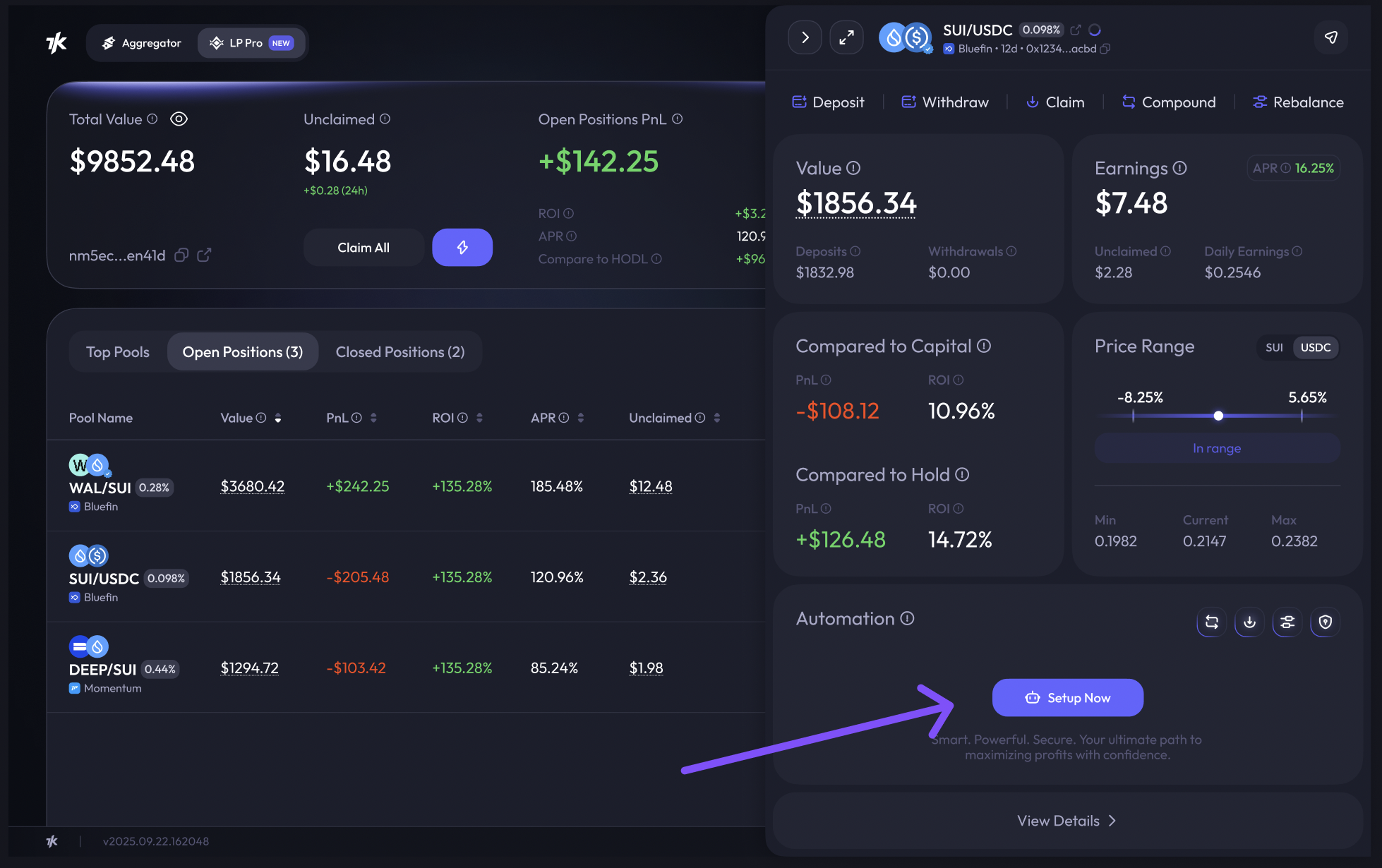
* In the **Automation** column, click **Setup** for the position you want.
* Select the automation type and configure your triggers.

<figure><img src="https://2380703610-files.gitbook.io/~/files/v0/b/gitbook-x-prod.appspot.com/o/spaces%2Fy7rOL9uvLN542fZi4a7q%2Fuploads%2FuwhCoZqGWo2x5vqPVZyn%2Fimage.png?alt=media&amp;token=46abfea7-f87d-48a9-9b55-66da9f4a844c" alt=""><figcaption></figcaption></figure>

**From Position Details**

* Click on a position to open its detail view.
* Go to the **Automation** section.
* Select the automation type (Compound, Claim, Rebalance, or Exit) and define your conditions.

<figure><img src="https://2380703610-files.gitbook.io/~/files/v0/b/gitbook-x-prod.appspot.com/o/spaces%2Fy7rOL9uvLN542fZi4a7q%2Fuploads%2FiwejihaCo0JPskEkjPOH%2Fimage.png?alt=media&amp;token=354064ae-9775-43ec-bf4a-c0f17813eb43" alt=""><figcaption></figcaption></figure>


# Auto Compound

Reinvest earnings automatically, maximize LP returns

## What is Auto Compound?

Auto Compound is a feature that automatically reinvests the earnings (fees and rewards) generated from your liquidity positions back into the same position. Instead of manually claiming and reinvesting, the system does this for you, helping you maximize returns through **compound interest**.

<figure><img src="https://2380703610-files.gitbook.io/~/files/v0/b/gitbook-x-prod.appspot.com/o/spaces%2Fy7rOL9uvLN542fZi4a7q%2Fuploads%2F37exnHWz2uFd0yBokUBj%2Fimage.png?alt=media&amp;token=ad854e2b-95fa-4b5e-989c-4e473d41537c" alt=""><figcaption></figcaption></figure>

## Why Use Auto Compound?

* **Save Time:** No need to manually harvest and reinvest earnings.
* **Boost Returns:** Automatically compounds profits for exponential growth.
* **Stay Consistent:** Ensures your strategy runs 24/7 without missing opportunities.

## How It Works

When you enable Auto Compound, the system monitors your liquidity position and executes compounding automatically based on the condition you choose:

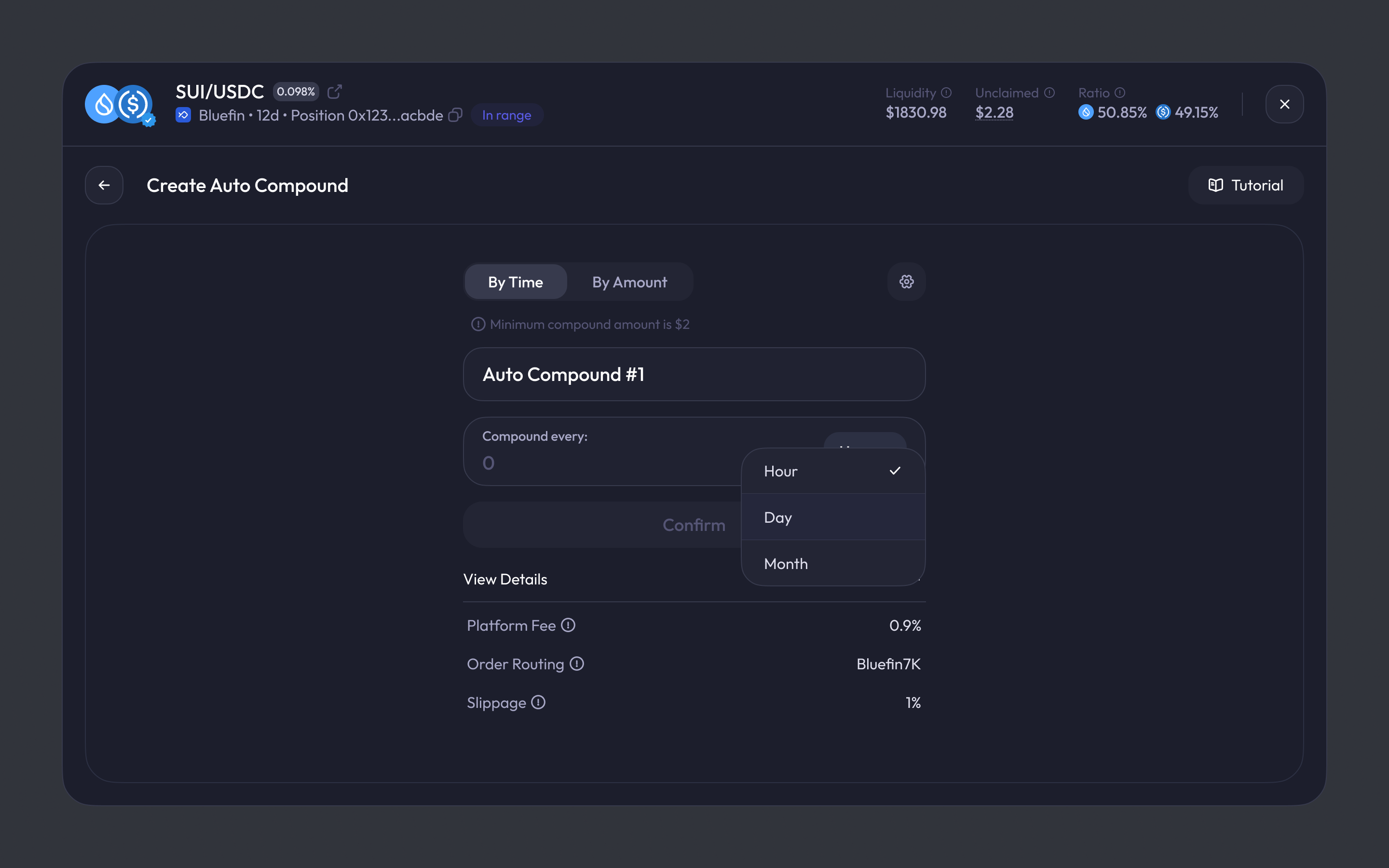
* **Time-based Trigger:** Compounds at fixed intervals (e.g., hourly, daily).
* **Value-based Trigger:** Compounds when your accumulated earnings reach a minimum threshold (e.g., $10, $50).

Each time compounding happens, your earnings are added back into the position, increasing its size and your future rewards.

## How to Set Up Auto Compound

Setting up Auto Compound is simple and takes only a few steps. Once enabled, the system will automatically handle reinvestment based on your chosen trigger.

### Step 1 — Open Your Position Details

Navigate to LP Pro → Open Positions, then select the position you want to enable Auto Compound for. This opens the detailed view showing your liquidity range, earnings, and settings.

<figure><img src="https://2380703610-files.gitbook.io/~/files/v0/b/gitbook-x-prod.appspot.com/o/spaces%2Fy7rOL9uvLN542fZi4a7q%2Fuploads%2FiwejihaCo0JPskEkjPOH%2Fimage.png?alt=media&amp;token=354064ae-9775-43ec-bf4a-c0f17813eb43" alt=""><figcaption></figcaption></figure>

<figure><img src="https://2380703610-files.gitbook.io/~/files/v0/b/gitbook-x-prod.appspot.com/o/spaces%2Fy7rOL9uvLN542fZi4a7q%2Fuploads%2FuKLKkPaf86aGWS4mXL7C%2Fimage.png?alt=media&amp;token=9a417b2c-123c-4962-ba5f-7f27dc893257" alt=""><figcaption></figcaption></figure>

### Step 2 — Choose Your Compounding Condition

Select how Auto Compound should operate:

**Option A — Time-based Trigger**

Auto-compounds your earnings at fixed intervals, such as: Every hour, every 6 hours or once per day.

<figure><img src="https://2380703610-files.gitbook.io/~/files/v0/b/gitbook-x-prod.appspot.com/o/spaces%2Fy7rOL9uvLN542fZi4a7q%2Fuploads%2FLmebVCO2ulCaHan5OKH6%2Fimage.png?alt=media&amp;token=e3f94341-3ae0-4d0a-96fd-bee40ae313f5" alt=""><figcaption></figcaption></figure>

**Option B — Value-based Trigger**

Auto-compounds only when your accumulated earnings reach a target amount, such as: $10, $25 or $50.

<figure><img src="https://2380703610-files.gitbook.io/~/files/v0/b/gitbook-x-prod.appspot.com/o/spaces%2Fy7rOL9uvLN542fZi4a7q%2Fuploads%2FWvOS2WiVXVyGeB2sCkDm%2Fimage.png?alt=media&amp;token=47c07da2-f209-4a94-98d1-3cc733540c7e" alt=""><figcaption></figcaption></figure>

### Step 3 — Confirm Setup

Click **Confirm** to finalize your Auto Compound configuration. Once activated, the automation runs automatically 24/7.

<figure><img src="https://2380703610-files.gitbook.io/~/files/v0/b/gitbook-x-prod.appspot.com/o/spaces%2Fy7rOL9uvLN542fZi4a7q%2Fuploads%2FLQ05oCZ4c0t2AMleF0o7%2Fimage.png?alt=media&amp;token=84259093-83c0-4905-b79f-16aa3ea6020c" alt=""><figcaption></figcaption></figure>

## Summary

Auto Compound automates the process of reinvesting your earned fees and rewards back into your liquidity position. By choosing between time-based or value-based triggers, you can optimize for either consistency or gas efficiency. Once configured, the system compounds your earnings automatically, helping your position grow over time without manual intervention. You maintain full control and visibility, with the ability to monitor results and adjust or disable the automation at any time.


# Auto Claim

## What is Auto Claim?

Auto Claim is an automation feature that automatically harvests the fees and rewards generated from your liquidity positions. Instead of manually checking and claiming your unclaimed amounts, Auto Claim automatically collects your earnings based on a schedule or condition you select.

This helps you stay efficient, avoid missing claim opportunities, and maintain full control over how your rewards are managed.

***

## Why Use Auto Claim?

* **Save Time:** No more manual claiming every few hours or days.
* **Stay Organized:** Prevent rewards from sitting idle or unclaimed for too long.
* **Automatic Zap Out:** Instantly convert all claimed rewards into a single token of your choice.

***

## How It Works

Auto Claim monitors your liquidity position and automatically triggers a claim action when your chosen condition is met:

* **Time-based Trigger:** Claims rewards at fixed intervals (e.g., every hour, every 6 hours, daily).
* **Amount-based Trigger:** Claims when the total unclaimed value reaches a minimum threshold.

After each claim, if **Zap Out** is enabled, your rewards are immediately swapped into a single token (e.g., SUI) before being sent to your wallet.

***

## How to Set Up Auto Claim

Setting up Auto Claim is straightforward. Follow these steps:

### **Step 1 — Open Your Position Details**

Go to **LP Pro → Open Positions**, then select the position where you want to enable Auto Claim. This opens the position details, showing your liquidity range, unclaimed rewards, and automation options.

<figure><img src="https://2380703610-files.gitbook.io/~/files/v0/b/gitbook-x-prod.appspot.com/o/spaces%2Fy7rOL9uvLN542fZi4a7q%2Fuploads%2FuwhCoZqGWo2x5vqPVZyn%2Fimage.png?alt=media&amp;token=46abfea7-f87d-48a9-9b55-66da9f4a844c" alt=""><figcaption></figcaption></figure>

<figure><img src="https://2380703610-files.gitbook.io/~/files/v0/b/gitbook-x-prod.appspot.com/o/spaces%2Fy7rOL9uvLN542fZi4a7q%2Fuploads%2FSJ42sQ6510yMI4krXcYh%2Fimage.png?alt=media&amp;token=1e374143-ee5c-4b67-ba49-22a94a466c08" alt=""><figcaption></figcaption></figure>

### **Step 2 — Start Creating an Auto Claim Rule**

Click on **Create Auto Claim** inside the automation section. You will see two configuration modes:

* **By Time**
* **By Amount**

Each mode gives you flexibility depending on your strategy.

#### **Option A — Time-Based Claim**

Use this mode when you want claims to happen on a fixed schedule.

Simply enter how often you want the system to claim (e.g., every **1 hour**, **6 hours**, or **24 hours**). This mode is ideal if you prefer predictable, routine claiming.

<figure><img src="https://2380703610-files.gitbook.io/~/files/v0/b/gitbook-x-prod.appspot.com/o/spaces%2Fy7rOL9uvLN542fZi4a7q%2Fuploads%2FBwgHpThExEJ97EzaSkmV%2Fimage.png?alt=media&amp;token=73c41cbb-c5e9-495c-8924-7e5775df876d" alt=""><figcaption></figcaption></figure>

#### **Option B — Amount-Based Claim**

Choose this mode if you want to minimize gas usage by claiming only when rewards reach a meaningful amount.

Simply enter the minimum USD value required to trigger a claim (e.g., **$2**, **$5**, **$10**, or higher).&#x20;

<figure><img src="https://2380703610-files.gitbook.io/~/files/v0/b/gitbook-x-prod.appspot.com/o/spaces%2Fy7rOL9uvLN542fZi4a7q%2Fuploads%2FepkB61KtkXBl9KUDLvJ8%2Fimage.png?alt=media&amp;token=d5963618-2e5c-49dd-84cb-3baea57be4d1" alt=""><figcaption></figcaption></figure>

### **Step 3 — Enable Zap Out (Optional)**

Turn ON **Zap Out** if you want all claimed rewards to be converted into a single token.

* Select your preferred output token (e.g., **SUI**, USDC, etc.)
* Rewards are auto-swapped and then sent to your wallet.

Useful if you want to *accumulate a single asset* or simplify tracking.

<figure><img src="https://2380703610-files.gitbook.io/~/files/v0/b/gitbook-x-prod.appspot.com/o/spaces%2Fy7rOL9uvLN542fZi4a7q%2Fuploads%2FoZOIP7cJWtSSn1gJwLaa%2Fimage.png?alt=media&amp;token=7216b618-34d7-4626-8148-7c08f1e08306" alt=""><figcaption></figcaption></figure>

### **Step 4 — Confirm Your Settings**

Click **Confirm** to finalize your Auto Claim rule.

Once confirmed:

* Your rule activates immediately.
* The automation system begins monitoring your position.
* No further manual action is needed unless you want to change or disable the rule.

<figure><img src="https://2380703610-files.gitbook.io/~/files/v0/b/gitbook-x-prod.appspot.com/o/spaces%2Fy7rOL9uvLN542fZi4a7q%2Fuploads%2FXnzbTzCntP9EjjiO4PIw%2Fimage.png?alt=media&amp;token=7cd1ee3f-cc4b-4b60-ac4e-baec7f8d8cc7" alt=""><figcaption></figcaption></figure>

### **Step 5 — Monitor Your Auto Claim Activity**

Inside your Position Details, you'll be able to see:

* Claim triggers (time or amount)
* Next scheduled claim (for time-based)

You can modify or disable the Auto Claim rule at any time.

<figure><img src="https://2380703610-files.gitbook.io/~/files/v0/b/gitbook-x-prod.appspot.com/o/spaces%2Fy7rOL9uvLN542fZi4a7q%2Fuploads%2FPffJGgLW1QWxmFx35TUy%2Fimage.png?alt=media&amp;token=736dca74-4d6c-4e1f-8c8a-72dbc069fd3f" alt=""><figcaption></figcaption></figure>

<figure><img src="https://2380703610-files.gitbook.io/~/files/v0/b/gitbook-x-prod.appspot.com/o/spaces%2Fy7rOL9uvLN542fZi4a7q%2Fuploads%2F44s2LLyvIW1XJPasMLMo%2Fimage.png?alt=media&amp;token=04ce1b4b-aff1-4df4-9d9a-edb0fde6ca50" alt=""><figcaption></figcaption></figure>

## Summary

Auto Claim is designed to make reward harvesting effortless. With flexible triggers, optional Zap Out conversion, and 24/7 automation, it's one of the most powerful tools to optimize your liquidity management on LP Pro.


# Auto Rebalance

Automated LP position adjustment based on predefined triggers

## What is Auto Rebalance?

Auto Rebalance is an automation feature that automatically adjusts your liquidity position whenever market conditions meet your predefined triggers. Instead of manually resetting your price range, the system updates it for you based on your selected strategy — ensuring your position remains active and continues earning fees.

<figure><img src="https://2380703610-files.gitbook.io/~/files/v0/b/gitbook-x-prod.appspot.com/o/spaces%2Fy7rOL9uvLN542fZi4a7q%2Fuploads%2FLp3OkqU3Nr9hKdrKwwS0%2Fimage.png?alt=media&amp;token=0fbaf7e4-b6a8-44b8-9e8a-ebe46bd707b9" alt=""><figcaption></figcaption></figure>

### Why Use Auto Rebalance?

* **Stay in Range:** Prevents your LP position from becoming inactive when the price moves beyond your selected boundaries.
* **Maximize Earnings:** Maintains optimal range placement to capture more trading fees.
* **Automate Workflows:** Eliminates the need for manual monitoring and adjustments.
* **Flexible Strategies:** Choose how the system should rebalance based on your risk and fee preferences.

## How It Works

Auto Rebalance consists of a few core components that work together to automate your liquidity strategy:&#x20;

* **Triggers:** conditions that activate rebalancing
* **Start Price:** reference price for calculations
* **New Range:** the next Min/Max range after activation
* **Time Delay:** buffer before execution
* **Recurring Mode:** automatically repeats the cycle

### **Trigger**

Auto Rebalance offers three types of triggers. A trigger activates the automation when market conditions match your configuration.

<figure><img src="https://2380703610-files.gitbook.io/~/files/v0/b/gitbook-x-prod.appspot.com/o/spaces%2Fy7rOL9uvLN542fZi4a7q%2Fuploads%2FEuLYYIBz2wS1iLy2Id7D%2Fimage.png?alt=media&amp;token=fe1baf95-344a-4f93-956b-b309e5f21f03" alt=""><figcaption></figcaption></figure>

#### **Out of Range Trigger**

<figure><img src="https://2380703610-files.gitbook.io/~/files/v0/b/gitbook-x-prod.appspot.com/o/spaces%2Fy7rOL9uvLN542fZi4a7q%2Fuploads%2FiBkjOKaz5eThJHi34cxF%2Fimage.png?alt=media&amp;token=576e8e0a-e131-448a-b2a8-db88fcdf4d63" alt=""><figcaption></figcaption></figure>

Fires when the current price moves **outside your existing liquidity range**.

You can choose:

* Min-only trigger (price drops below your min range)
* Max-only trigger (price rises above your max range)
* Both

#### **Price Change Percentage Trigger**

<figure><img src="https://2380703610-files.gitbook.io/~/files/v0/b/gitbook-x-prod.appspot.com/o/spaces%2Fy7rOL9uvLN542fZi4a7q%2Fuploads%2F1d7ERhfT1im00D2Ckz9c%2Fimage.png?alt=media&amp;token=b5389c4f-afda-44d2-965d-73ad706b42ec" alt=""><figcaption></figcaption></figure>

Fires when the price moves by a specific **percentage** relative to the current price.

Supports:

* Below current by X%
* Above current by X%
* You may combine both directions.

Example (based on the image):

* Current Price: **3.00**
* Start Price set to: **2.90**
* Below Start Price: **-15%** → Trigger fires if price drops **15% below 2.90**, meaning it reaches **2.465**.
* Above Start Price: **+15%** → Trigger fires if price rises **15% above 2.90**, meaning it reaches **3.335**.

#### **Absolute Price Trigger**

<figure><img src="https://2380703610-files.gitbook.io/~/files/v0/b/gitbook-x-prod.appspot.com/o/spaces%2Fy7rOL9uvLN542fZi4a7q%2Fuploads%2FjJbu0wBBSHzonP3WmZ0z%2Fimage.png?alt=media&amp;token=f684ded2-0541-4784-96ed-5f6165a05588" alt=""><figcaption></figcaption></figure>

Fires at a specific **absolute price level**.

Supports:

* Below current by X \<quote-token>
* Above current by X \<quote-token>
* You may combine both directions.

Example based on the above image (SUI/USDC Absolute Price Trigger):

* Start Price: **2.90 USDC**
* "Below Start Price by **-0.3 USDC**" → trigger fires when price drops to **2.60 USDC**.
* "Above Start Price by **+0.5 USDC**" → trigger fires when price rises to **3.40 USDC**.

#### **Start Price**

The reference price used for your trigger. You can set it manually or use the current market price instantly.

*Example 1 — Using Current Price (SUI/USDC pool)*\
If SUI is currently **3.00 USDC**, tapping **Use Current** sets the Start Price to 3.00 USDC immediately.

<figure><img src="https://2380703610-files.gitbook.io/~/files/v0/b/gitbook-x-prod.appspot.com/o/spaces%2Fy7rOL9uvLN542fZi4a7q%2Fuploads%2FNlTsgVakme1otaTAj8WH%2Fimage.png?alt=media&amp;token=dc36d5f5-baac-4167-862b-dbbe684c4dc5" alt=""><figcaption></figcaption></figure>

*Example 2 — Manual Start Price*\
You believe the key level is **2.90 USDC**, so you manually enter 2.90 USDC. Trigger conditions (e.g., below or above) are calculated from this custom reference.

<figure><img src="https://2380703610-files.gitbook.io/~/files/v0/b/gitbook-x-prod.appspot.com/o/spaces%2Fy7rOL9uvLN542fZi4a7q%2Fuploads%2FjJbu0wBBSHzonP3WmZ0z%2Fimage.png?alt=media&amp;token=f684ded2-0541-4784-96ed-5f6165a05588" alt=""><figcaption></figcaption></figure>

### **New Range**

New Range defines the next liquidity boundaries (Min and Max) that your position will move into after a trigger activates.

<figure><img src="https://2380703610-files.gitbook.io/~/files/v0/b/gitbook-x-prod.appspot.com/o/spaces%2Fy7rOL9uvLN542fZi4a7q%2Fuploads%2FutRHXJYqZ3XFnFoMFu4r%2Fimage.png?alt=media&amp;token=1ac98a03-3645-494b-b565-5d9031062088" alt=""><figcaption></figcaption></figure>

After a trigger activates, the system creates a new price range based on:

* **Below Future Price** → new Min
* **Above Future Price** → new Max

New Range can be configured in two ways, and both methods are calculated based on the **future price** after the trigger condition is hit:

* **Absolute Price Mode:** Set the exact price difference from the future price (e.g., ±0.3 USDC).
* **Percentage Mode:** Set the range based on percentage movement relative to the future price (e.g., ±10 %).

### Time Delay

Adds a buffer time before the automation executes. The trigger only executes if the condition stays valid for the duration you set.

<figure><img src="https://2380703610-files.gitbook.io/~/files/v0/b/gitbook-x-prod.appspot.com/o/spaces%2Fy7rOL9uvLN542fZi4a7q%2Fuploads%2FfJbEJ8kedxIWKNRc7lh9%2Fimage.png?alt=media&amp;token=4b19eea4-9169-4b2a-afa2-605e65e32372" alt=""><figcaption></figcaption></figure>

**Example:**

* You set a **1‑hour Time Delay**.
* Price hits the trigger level but only stays there for **2 seconds** → **No rebalance** happens.
* After **1 hour**, the system checks the trigger condition again; if the condition is still satisfied, it **executes the rebalance**.

This helps prevent unnecessary rebalances caused by quick spikes or temporary volatility.

## **Ending Trigger**

The **Ending Trigger** determines when an automation cycle should stop after it has started. It acts as a final condition that, once met, terminates the current rebalance cycle.&#x20;

To activate the Ending Trigger, turn on the toggle switch:

<figure><img src="https://2380703610-files.gitbook.io/~/files/v0/b/gitbook-x-prod.appspot.com/o/spaces%2Fy7rOL9uvLN542fZi4a7q%2Fuploads%2FC32oPwXD3Hg1fpUQaxDI%2Fimage.png?alt=media&amp;token=1c71fe17-267a-4d22-b964-d79f915427b6" alt=""><figcaption></figcaption></figure>

Users can configure Ending Trigger using **three modes**: Price, Time, and Count.

#### **Ending Trigger — Price Mode**

Allows you to stop the automation when price crosses a specific price level.&#x20;

<figure><img src="https://2380703610-files.gitbook.io/~/files/v0/b/gitbook-x-prod.appspot.com/o/spaces%2Fy7rOL9uvLN542fZi4a7q%2Fuploads%2FESe5nw72Yje4tgWhFEBH%2Fimage.png?alt=media&amp;token=bb6d2d77-da7a-41e6-a2d3-87f797a0eb6b" alt=""><figcaption></figcaption></figure>

You can configure:

* **Price drops below X** → stops the cycle when price falls below your chosen threshold.
* **Price rises above X** → stops the cycle when price increases above your chosen threshold.

**Example (SUI/USDC):**

* Start Price: **2.90**
* Ending Trigger (Price): Price drops below **2.35**, or price rises above **3.60** In either case, once the price hits one of these boundaries, the cycle **ends**.

#### **Ending Trigger — Time Mode**

Stops the automation after a set duration has passed from the moment the cycle begins.

<figure><img src="https://2380703610-files.gitbook.io/~/files/v0/b/gitbook-x-prod.appspot.com/o/spaces%2Fy7rOL9uvLN542fZi4a7q%2Fuploads%2F8cO5sG0K330CxilmFHkj%2Fimage.png?alt=media&amp;token=08e99764-44b1-4610-beb8-182eb0dd0728" alt=""><figcaption></figcaption></figure>

**Example:**

* Ending Trigger set to **12 hours**
* Even if the automation has not executed all possible rebalances, after **12 hours**, the cycle ends.

Useful when you want automation to run only for a limited time window.

#### **Ending Trigger — Count Mode**

Ends the cycle after a specific number of successful rebalances.

<figure><img src="https://2380703610-files.gitbook.io/~/files/v0/b/gitbook-x-prod.appspot.com/o/spaces%2Fy7rOL9uvLN542fZi4a7q%2Fuploads%2FIruzHMY037osYOKv18qo%2Fimage.png?alt=media&amp;token=cd32f7a5-57b6-4bd1-b000-bfc7cf56305c" alt=""><figcaption></figcaption></figure>

**Example:**

* Ending Trigger set to **12 executions** Once 12 rebalances have been completed, the automation stops regardless of price conditions.

### **Compound & Recurring**

These settings allow you to customize how the automation behaves after each rebalance.

<figure><img src="https://2380703610-files.gitbook.io/~/files/v0/b/gitbook-x-prod.appspot.com/o/spaces%2Fy7rOL9uvLN542fZi4a7q%2Fuploads%2FeJXgekPb7WcDfuTqd0bq%2Fimage.png?alt=media&amp;token=c6bac68c-3c66-4fc5-82d2-0ebb8ca0a6a4" alt=""><figcaption></figcaption></figure>

#### **Compound**

If enabled, all tokens left after the rebalance (e.g., unutilized amounts or rewards) are automatically added back into your liquidity position before deploying into the new range.

**Example (SUI/USDC):**

* After a rebalance, you have **$18** leftover.
* With **Compound ON**, the system adds this $18 to your liquidity and deploys a larger position into the new range.
* With **Compound OFF**, the $18 remains in your wallet or stays idle.

#### **Recurring**

If enabled, the automation will start a **new cycle** after completing the current rebalance.

**Example:**

* Your trigger activates at price **3.40** and a rebalance executes.
* With **Recurring ON**, the system automatically resets a fresh cycle using the updated Start Price and conditions.
* With **Recurring OFF**, the automation stops after one rebalance until you manually re‑enable it.

## How to Set Up Auto Rebalance

Setting up Auto Rebalance is simple:

### **Step 1 — Open Your Position Details**

Go to **LP Pro  → Open Positions**, then select the position you want to automate.

<figure><img src="https://2380703610-files.gitbook.io/~/files/v0/b/gitbook-x-prod.appspot.com/o/spaces%2Fy7rOL9uvLN542fZi4a7q%2Fuploads%2FiwejihaCo0JPskEkjPOH%2Fimage.png?alt=media&amp;token=354064ae-9775-43ec-bf4a-c0f17813eb43" alt=""><figcaption></figcaption></figure>

### **Step 2 — Create an Auto Rebalance Rule**

Inside your Position Details panel, click **Create Auto Rebalance**.&#x20;

<figure><img src="https://2380703610-files.gitbook.io/~/files/v0/b/gitbook-x-prod.appspot.com/o/spaces%2Fy7rOL9uvLN542fZi4a7q%2Fuploads%2F121jYD2imu3pFiRQtJMt%2Fimage.png?alt=media&amp;token=23ef6f27-8102-4775-bb1b-4c4efb876871" alt=""><figcaption></figcaption></figure>

You’ll be asked to choose your preferred rebalance strategy.&#x20;

<figure><img src="https://2380703610-files.gitbook.io/~/files/v0/b/gitbook-x-prod.appspot.com/o/spaces%2Fy7rOL9uvLN542fZi4a7q%2Fuploads%2FLp3OkqU3Nr9hKdrKwwS0%2Fimage.png?alt=media&amp;token=0fbaf7e4-b6a8-44b8-9e8a-ebe46bd707b9" alt=""><figcaption></figcaption></figure>

The meaning of each field has already been explained above.

### **Step 3 — Confirm Setup**

Once you click **Confirm**, your Auto Rebalance rule becomes active:

* The system monitors your position 24/7
* Rebalances happen automatically when conditions are met

<figure><img src="https://2380703610-files.gitbook.io/~/files/v0/b/gitbook-x-prod.appspot.com/o/spaces%2Fy7rOL9uvLN542fZi4a7q%2Fuploads%2FPftIqaNgevOfrFhYEaNF%2Fimage.png?alt=media&amp;token=b9ed886b-f097-4959-b92c-7f91ac538b2a" alt=""><figcaption></figcaption></figure>

### Step 4 — Monitor Auto Rebalance Activity

In your Position Details, you will find a detailed list of all Auto Rebalance rules you have configured:

<figure><img src="https://2380703610-files.gitbook.io/~/files/v0/b/gitbook-x-prod.appspot.com/o/spaces%2Fy7rOL9uvLN542fZi4a7q%2Fuploads%2FgodShGO3KEEibuCEEcwk%2Fimage.png?alt=media&amp;token=eb73e6d1-a3ac-4ef6-afe9-44419759a9eb" alt=""><figcaption></figcaption></figure>

You can modify or disable the rule anytime.

## Summary

Auto Rebalance keeps your LP position optimized without constant manual intervention. With multiple trigger types and strategy options, it adapts to beginners and advanced LPs alike — helping you stay active, capture more fees, and manage liquidity efficiently.


# Auto Exit

Automated position exit based on predefined price thresholds

## **What is Auto Exit?**

Auto Exit is an automation feature that helps you protect your liquidity and lock in gains by automatically exiting your LP position when the market hits conditions you define. Instead of manually watching the chart 24/7, Auto Exit ensures your position is closed at the right moment and the funds are returned to your wallet.

<figure><img src="https://2380703610-files.gitbook.io/~/files/v0/b/gitbook-x-prod.appspot.com/o/spaces%2Fy7rOL9uvLN542fZi4a7q%2Fuploads%2FMGW8IBUv3IfUe66pxp03%2Fimage.png?alt=media&amp;token=50828f74-38c6-4d63-a67c-3d7af23e8ca7" alt=""><figcaption></figcaption></figure>

### Why Use Auto Exit?

* **Protect Capital:** Exit before large price drops.
* **Secure Profit:** Lock in gains when the price reaches your target.
* **Eliminate Emotion:** Automate decisions with rule-based logic.
* **Hands-Free Safety:** Avoid missing exit opportunities due to market volatility.

## How It Works

Auto Exit monitors the pool price and triggers an exit when your chosen condition is met.&#x20;

Available trigger types include:&#x20;

* Absolute Price Trigger
* Percentage Trigger
* Range Trigger

### **1. Absolute Price Trigger**

<figure><img src="https://2380703610-files.gitbook.io/~/files/v0/b/gitbook-x-prod.appspot.com/o/spaces%2Fy7rOL9uvLN542fZi4a7q%2Fuploads%2Fry3eYk22IstCjVsqSfus%2Fimage.png?alt=media&amp;token=91ba66a2-58ed-45e6-bcd0-21fede56ccfd" alt=""><figcaption></figcaption></figure>

Fires when price goes below or above your configured Start Price offsets.

* Below Start Price by X
* Above Start Price by Y
* Supports using both directions

**Example (SUI/USDC):**

* Start Price: **2.90**
* Below Start Price by **-0.3** → Exit when price hits **2.60**
* Above Start Price by **+0.5** → Exit when price hits **3.40**

### **2. Percentage Trigger**

<figure><img src="https://2380703610-files.gitbook.io/~/files/v0/b/gitbook-x-prod.appspot.com/o/spaces%2Fy7rOL9uvLN542fZi4a7q%2Fuploads%2FbAwwoXA475ATc9NwecoF%2Fimage.png?alt=media&amp;token=dcd4c3c5-9864-4eff-8844-b9a49708a0d5" alt=""><figcaption></figcaption></figure>

Fires when price moves by a percentage relative to your Start Price.

* Below Start Price by X%
* Above Start Price by Y%
* Supports using both directions

**Example (SUI/USDC):**

* Start Price: **3.00**
* Below by **-10%** → Exit at **2.70**
* Above by **+15%** → Exit at **3.45**

### **3. Range Trigger**

<figure><img src="https://2380703610-files.gitbook.io/~/files/v0/b/gitbook-x-prod.appspot.com/o/spaces%2Fy7rOL9uvLN542fZi4a7q%2Fuploads%2FzRCdGR86mTV2cTxETaoq%2Fimage.png?alt=media&amp;token=d78a856e-d425-406b-84d5-fb59a8155789" alt=""><figcaption></figcaption></figure>

Fires when the price leaves a defined range.

* Price drops below Min
* Price rises above Max
* Supports using both directions

**Example (SUI/USDC):**

* Min range: **2.50** → Exit if price drops below 2.50
* Max range: **3.60** → Exit if price rises above 3.60

### **Time Delay (Optional)**

Adds a buffer period before exit executes. If the price condition is still valid after this delay, the exit is triggered.

<figure><img src="https://2380703610-files.gitbook.io/~/files/v0/b/gitbook-x-prod.appspot.com/o/spaces%2Fy7rOL9uvLN542fZi4a7q%2Fuploads%2FJhCBu7ww2vXyGiSYAleq%2Fimage.png?alt=media&amp;token=b25172b4-5b51-476d-96de-8b9440f426df" alt=""><figcaption></figcaption></figure>

**Example:**

* Time Delay: **12 hours**
* Price hits trigger but quickly reverses → No exit
* After 12 hours, if price is still beyond the trigger → Exit executes

Once triggered, Auto Exit closes your LP position and returns the assets to your wallet.

## How to Set Up Auto Exit

Follow these steps to create an Auto Exit rule:

### **Step 1 — Open Your Position Details**

Go to **LP Pro → Open Positions**, then select the position you want to automate.

<figure><img src="https://2380703610-files.gitbook.io/~/files/v0/b/gitbook-x-prod.appspot.com/o/spaces%2Fy7rOL9uvLN542fZi4a7q%2Fuploads%2FuwhCoZqGWo2x5vqPVZyn%2Fimage.png?alt=media&amp;token=46abfea7-f87d-48a9-9b55-66da9f4a844c" alt=""><figcaption></figcaption></figure>

### **Step 2 — Create Auto Exit**

Click **Create Auto Exit** to begin configuring your rule.

<figure><img src="https://2380703610-files.gitbook.io/~/files/v0/b/gitbook-x-prod.appspot.com/o/spaces%2Fy7rOL9uvLN542fZi4a7q%2Fuploads%2FJLogy0R9vJTchg5IQFPj%2Fimage.png?alt=media&amp;token=ce2c200d-335a-4ad6-a30b-2f4eab0412a4" alt=""><figcaption></figcaption></figure>

### Step 3 — Confirm Setup

Click **Confirm** to activate your Auto Exit rule. The system begins monitoring immediately.

<figure><img src="https://2380703610-files.gitbook.io/~/files/v0/b/gitbook-x-prod.appspot.com/o/spaces%2Fy7rOL9uvLN542fZi4a7q%2Fuploads%2FhaMu0TXW9P4tPXgKZ5Hx%2Fimage.png?alt=media&amp;token=bd2fa9e8-f3f8-42ac-9421-43522ffc79ef" alt=""><figcaption></figcaption></figure>

### Step 4 — Monitor Auto Exit Activity

In your Position Details, you will find a detailed list of all Auto Exit rules you have configured:

<figure><img src="https://2380703610-files.gitbook.io/~/files/v0/b/gitbook-x-prod.appspot.com/o/spaces%2Fy7rOL9uvLN542fZi4a7q%2Fuploads%2F8uHwYIKJgHuPXOx8Q21z%2Fimage.png?alt=media&amp;token=672abdf6-3d34-49fc-b12b-49767e8a75f7" alt=""><figcaption></figcaption></figure>

You may disable or modify your Auto Exit rule at any time.

## Summary

Auto Exit gives you full control over when to safely exit your liquidity position. With multiple trigger types and optional Time Delay, it allows you to automate profit-taking or loss protection without constant monitoring.


# Referral

Invite friends. Earn together.

## What you get

**Referrer (inviter):** Earn a commission from your friends’ trading fees. Rewards accrue, and you can claim them later.\
**Invitee (referred friend):** Earn cashback from your own trading fees. Cashback accrues and you can claim it later. Both are paid out in **SUI** (the platform auto-swaps to SUI). Balances update **daily**.

## How it works

Every referral code sets the split of a fixed **20%** reward pool between **Referrer Commission** and **Invitee Cashback**. Available presets: **20–0, 15–5, 10–10, 5–15, 0–20** (Referrer% – Invitee%).

**Examples**

* Fees = **$100**, split **15–5** → Referrer **$15**, Invitee **$5**.
* Fees = **$100**, split **10–10** → Referrer **$10**, Invitee **$10**.

**Claiming**\
Commission and cashback accrue and update daily at 2:00 AM UTC. Once available, they can be claimed at any time. All payouts are made in SUI.

## Using referral codes

### If you’re a referrer

1. **Create codes:** Choose a split (e.g., **15–5**), pick a **5–12** character alphanumeric code, and optionally add a note. Once created, the **code and split are permanent**. Need a different setup? Just create a new referral code—there’s **no limit** to how many you can make.
2. **Share:** Give friends your code or a link like `...?ref=<your-code>`.&#x20;
3. **Track & claim:** Check **Invited Friends**, **Total Commission**, token details, and **Claim History**. Claim your **Unclaimed Commission** whenever you’re ready.

### If you’re an invitee

1. **Enter code:** Paste a referrer’s code (or click their referral link) and confirm. You can only set this **once**; it can’t be changed later.
2. **Trade as usual:** Fees apply normally; your **cashback accrues** in the background. Balances update **daily**.
3. **Claim:** When your **cashback** shows up as available, claim it to receive **SUI**.

## FAQ

<details>

<summary><strong>Does cashback reduce my fee at checkout?</strong></summary>

No. Fees are charged in full; **cashback accrues** and can be claimed later (in SUI).

</details>

<details>

<summary><strong>What happens if I forget to claim?</strong></summary>

Nothing is lost — your balance **accumulates** until you claim.

</details>

<details>

<summary><strong>Can referrers change a code’s split ratio later?</strong></summary>

No. Once a referral code is created, both the **code** and its **split** are locked. You can still edit the **note**, and you can always create **additional codes** with different splits (no limit). Existing invitees linked to an old code keep that code’s split; share the new code for future invites.

</details>

<details>

<summary>Can I create multiple referral codes?</summary>

Yes. You can create **as many codes as you want**, each with its own fixed split.

</details>

<details>

<summary><strong>Can invitees change the referral code they entered?</strong></summary>

No. An invitee can enter a referral code **only once** and **cannot change it** after confirming. A confirmation screen shows the code, inviter (short wallet), and cashback % before they lock it in.

</details>

<details>

<summary>When do commissions/cashback show up?</summary>

They **accrue** and **update daily**. If you don’t see changes right after a trade, check again after the next daily update.

</details>

<details>

<summary>How do I get paid?</summary>

All commissions and cashback are automatically **swapped to SUI**, and you’ll **claim** them to your wallet when available.

</details>


# SDK

Introduction To 7K Aggregator SDK

Follow the instructions in these links to start using our SDK. Please [contact](https://docs.7k.ag/resources/contacts) us if you encounter any difficulties.

{% embed url="<https://github.com/7k-ag/7k-sdk-ts>" %}

{% embed url="<https://www.npmjs.com/package/@7kprotocol/sdk-ts>" %}


# Contacts

Get In Touch With Us!

* Application: <https://7k.ag/>
* Linktree: <https://linktr.ee/7k_ag_>
* Discord: <https://discord.gg/vNhgKEawXn>


# Terms of Service

These Terms of Use ("**Terms**") are a binding agreement between **7K Smart Trading Inc.**, a company incorporated in the Republic of Panama ("**7K**," "**we**," "**us**," or "**our**"), and each person or entity that accesses or uses our Site or Services ("**you**" or "**User**"). By accessing or using the Site or Services, you agree to these Terms. If you do not agree, do not use the Site or Services.

**Last Updated:** September 23rd, 2025

## 1. Definitions

* **Company / Operator:** 7K Smart Trading Inc., Republic of Panama.
* **Site:** Any 7K website, web application, or interface we operate that surfaces the Services.
* **Services:** (i) **Swap** (liquidity aggregator UI); (ii) **LP Pro** (tools to create, adjust, and manage LP positions on DEXs). **7K provides tools and interfaces; it is not itself a protocol, matching engine, or custodian.**
* **Third‑Party Protocols / Smart Contracts:** Decentralized smart contracts and protocols operated by third parties and/or DAO communities; not controlled by 7K. Interactions with them occur on-chain, outside the Services.
* **Wallet:** A non‑custodial wallet you control.
* **Restricted Person / Territory:** See §4 (Eligibility; Restricted Use).

## 2. Nature of the Services (Interface‑Only; Non‑Custodial)

2.1 **Interface only.** The Services are informational tools that may read publicly available blockchain data and help you prepare transaction messages for submission from your Wallet to Third‑Party Protocols. Using those protocols does **not** require the Site. We do not execute, settle, clear, or custody any transaction for you. You must review, authorize, and broadcast any transaction from your own Wallet.

2.2 **No control of protocols.** We do not own, operate, or control the underlying protocols and smart contracts you may interact with, and we are not responsible for their functionality, security, pricing oracles, governance, upgrades, forks, bugs, exploits, or outcomes.

2.3 **No advisory, brokerage, or fiduciary role.** 7K does not provide investment, legal, tax, accounting, or other professional advice; does not solicit or accept orders; is not a broker‑dealer, ATS, exchange, MSB, or bank; owes no fiduciary duties; and is not under active prudential or market‑conduct supervision.

## 2A. Automation Services; Delegated Transaction Authorization

**2A.1 Interface‑only, no custody, no discretion.** Automation Services are **ministerial tools**. 7K **does not** take custody of assets or make discretionary decisions. We act **only** to monitor conditions you configured and to **submit transactions that match your Automation Instructions** using your Delegated Authorization. We do not guarantee execution, price, timing, or outcomes.

**2A.2 Your appointment of 7K as limited agent.** You **appoint 7K as your limited agent** solely to (a) monitor the conditions you define; (b) generate and submit transaction messages that **strictly conform** to your Automation Instructions.

**2A.3 Forms of Delegated Authorization.** Depending on the chain/token/wallet, the Services may request one or more of the following **revocable** authorizations.

**2A.5 Revocation & changes.** You may **revoke** Delegated Authorization at any time by using in‑app "Pause/Stop/Delete Automation"; (ii) using any on‑chain cancel methods we expose. Revocations take effect once processed on‑chain or by our systems. **In‑flight** transactions already submitted may still settle.

**2A.6 No best‑execution, no guarantees.** We do **not** undertake a broker‑style "best execution" duty. Quotes, routes, fills, reverts, MEV effects, and timing are determined by networks/protocols and may differ from previews. We may use private relay/auction pathways (e.g., MEV‑aware submission) when available, but we **do not** guarantee protection against frontrunning or sandwiching.

**2A.7 Keepers/Relayers; third‑party dependencies.** We may use **Keepers/Relayers** (our own or third‑party) to monitor conditions and broadcast transactions. Network congestion, oracle delays, outages, RPC/relayer failures, or protocol issues may prevent or delay execution; **we are not liable** for missed or duplicate triggers arising from such dependencies.

**2A.8 Your responsibilities (automation).** You:

* remain responsible for **funds, keys, and allowances**;
* must validate all Automation Instructions and addresses (tokens, pools, vaults);
* accept risks of **volatility, liquidation, impermanent loss, reorgs, oracles, MEV**;
* acknowledge that **any token or protocol‑level bug/exploit** is outside our control.

**2A.9 Fees.** We may charge **automation/relayer fees**, which will be disclosed in‑app. You authorize deduction or separate collection of such fees in connection with each executed transaction, together with network/protocol fees and any paymaster costs (if used).

**2A.10 Compliance & restrictions.** Automation Services are unavailable to **Restricted Persons/Territories** and remain subject to all geoblocking and sanctions controls in §4. **Circumvention is prohibited.**

**2A.11 Pauses; emergencies.** We may **pause or cancel** Automation Services, wholly or for specific wallets/pools, at our discretion for security, risk, or compliance. We may **not** be able to cancel transactions already submitted on‑chain.

**2A.12 Logs & transparency.** We will provide an **activity log** (on‑chain txids and time‑stamped trigger records) for Automation Services. You consent to our holding minimal operational metadata necessary to provide the service and to comply with law.**2A.13 No fiduciary duty; no advisory.** Our role is mechanical execution per your parameters. We **do not** provide investment, legal, tax, or accounting advice, and owe **no fiduciary duties**.

## 3. Service‑Specific Disclosures

3.1 **Swap (liquidity aggregator).** Quotes, routes, slippage, gas estimates, and fills are determined by the relevant protocols and network conditions. Outcomes may differ from previews due to MEV, reverts, or price movement.

3.2 **LP Pro.** LP positions carry material risks including impermanent loss, pool misconfiguration, volatile fees, and smart‑contract risk in the DEX or gauges you select.

## 4. Eligibility; Restricted Use

4.1 **Minimum age & capacity.** You must be at least 18 and have capacity to contract.

4.2 **Restricted Territories / Persons.** **You may not use the Services if you are a "Restricted Person,"** meaning you are (a) a citizen, resident, located or organized in, or otherwise accessing the Services from **the United States, Canada, Vietnam**, or any jurisdiction in which use of similar crypto interfaces is illegal or requires licensing we do not hold; (b) located in any **embargoed or comprehensively sanctioned** country/region (including, without limitation, **Cuba, Iran, North Korea, Syria, and the Crimea, Donetsk, or Luhansk regions**), or any other territory subject to broad trade restrictions; or (c) listed on, or owned/controlled by a person listed on, the **OFAC** SDN or other U.S. sanctions lists, **UK OFSI/HM Treasury** consolidated list, the **EU consolidated financial sanctions list**, or the **UN Security Council consolidated list**. You also may not transact with or on behalf of any such person.

4.3 **United Kingdom.** If you access the Services from the UK, you represent you are lawfully permitted to receive financial promotions (e.g., an investment professional under an available exemption) and will not rely on the Services as a financial promotion to the general public.

4.4 **No circumvention.** **Using VPNs, proxies, or similar tools to circumvent geoblocks is prohibited.** We may geo‑restrict or block addresses, IPs, Wallets, or front‑ends at our discretion and may share information with competent authorities to comply with law.

## 5. Your Responsibilities

* Maintain sole control and security of your Wallet, private keys, seed phrases, 2FA, and devices. We cannot recover keys or funds.
* Comply with all applicable laws (including AML/CFT and sanctions).
* Use the Services only for lawful purposes, without attempting to scrape, DDoS, spam, manipulate markets, front‑run, wash trade, or exploit smart contracts.
* Independently verify all information (including token addresses, pool addresses, vault parameters, and draft transactions) before signing.

## 6. Fees & Taxes

6.1 **Our fees.** We may charge interface fees or receive integration revenue as disclosed in‑app at the time of use.

6.2 **Third‑party/network fees.** You are responsible for gas, bridge fees, protocol fees, and third‑party on/off‑ramp fees. On‑chain transactions are irreversible; we cannot reverse or refund network or protocol fees.

6.3 **Taxes.** You are solely responsible for reporting and paying any taxes arising from your use of the Services.

## 7. No Professional Advice; No Offer

All information is provided **"as is"** for informational purposes only and does not constitute investment, legal, tax, or accounting advice or an offer or solicitation to buy/sell any asset or to provide any service requiring registration or licensing.

## 8. Intellectual Property; License

Subject to these Terms, we grant you a personal, revocable, non‑exclusive, non‑transferable license to use the Site solely to access the Services. All 7K content (excluding third‑party marks) is our property. You may not copy, modify, or create derivatives except as permitted by law.

## 9. Privacy

We may collect limited operational data (e.g., IP address, device metadata, wallet address) to operate the Services, apply geoblocks, and comply with law, as described in our Privacy Policy (incorporated by reference). We may disclose information to authorities where required by law.

## 10. Risks You Assume

Crypto and smart‑contract systems are experimental and risky. Without limitation, you assume risks from: market volatility, impermanent loss, liquidation, slippage/MEV, bugs/exploits, oracle or governance failures, forks, chain halts, mempool reorgs, RPC outages, key loss, phishing, malware, and adverse legal or regulatory actions. You may lose all value.

## 11. Third‑Party Links & Services

The Services may link to or surface third‑party services (bridges, on/off‑ramps, wallets, analytics). Those are governed by their own terms; we are not responsible for them and do not endorse them.

## 12. Prohibited Uses (Examples)

You must not: (a) violate law or sanctions; (b) use the Services if you are a Restricted Person; (c) attempt to bypass geoblocks; (d) spam, scrape, or attack the Site; (e) engage in fraud, deception, market manipulation (including spoofing, wash trading, front‑running), or IP infringement; (f) interfere with others' use; (g) use the Services to raise capital (ICOs/IEOs) or offer securities unless lawfully registered or exempt; (h) use Automation Services to grant open‑ended or **unbounded** authorizations (e.g., unlimited allowance without caps/expiry) or to **circumvent** geoblocks/sanctions; (i) provide Automation Instructions that rely on **manipulated or non‑independent data** (e.g., self‑quoted or soft‑oracle inputs).

## 13. Modifications; Availability

We may change, suspend, or discontinue any part of the Services at any time without liability, including for maintenance, upgrades, legal compliance, risk controls, or due to third‑party/RPC/network outages. We may update these Terms by posting the updated version on the Site; continued use constitutes acceptance.

## 14. Disclaimers

THE SITE AND SERVICES ARE PROVIDED **"AS IS" AND "AS AVAILABLE."** TO THE MAXIMUM EXTENT PERMITTED BY LAW, WE DISCLAIM ALL WARRANTIES (EXPRESS, IMPLIED, OR STATUTORY), INCLUDING MERCHANTABILITY, FITNESS FOR A PARTICULAR PURPOSE, TITLE, NON‑INFRINGEMENT, UPTIME, ACCURACY, OR RELIABILITY. YOU USE THE SERVICES AT YOUR OWN RISK.

## 15. Limitation of Liability

TO THE MAXIMUM EXTENT PERMITTED BY LAW, IN NO EVENT WILL 7K OR ITS AFFILIATES, OFFICERS, DIRECTORS, EMPLOYEES, OR AGENTS BE LIABLE FOR INDIRECT, INCIDENTAL, SPECIAL, CONSEQUENTIAL, EXEMPLARY, OR PUNITIVE DAMAGES; LOSS OF PROFITS, DATA, OR GOODWILL; OR COST OF SUBSTITUTE SERVICES, ARISING OUT OF OR RELATING TO THE SERVICES OR THESE TERMS, EVEN IF ADVISED OF THE POSSIBILITY. **OUR TOTAL LIABILITY FOR ALL CLAIMS WILL NOT EXCEED THE GREATER OF (A) USD $100 OR (B) THE FEES YOU PAID TO US FOR THE RELEVANT SERVICE IN THE 12 MONTHS BEFORE THE EVENT GIVING RISE TO LIABILITY.**

## 16. Indemnification

You will defend, indemnify, and hold harmless 7K and its affiliates, officers, directors, employees, agents, and partners from and against any claims, losses, liabilities, damages, costs, and expenses (including reasonable attorneys' fees) arising out of or relating to your use of the Services, violation of these Terms, or violation of any law or third‑party right.

## 17. Governing Law; Dispute Resolution; Class‑Action Waiver

17.1 **Governing law & forum.** These Terms are governed by the laws of the **Republic of Panama**, without regard to conflicts principles.

17.2 **Arbitration.** All disputes **shall be resolved by confidential, binding arbitration seated in Panama**, conducted in English **under the Commercial Arbitration Rules of the American Arbitration Association (AAA)** by a single arbitrator. The award is final and may be entered in any court of competent jurisdiction. **No jury trial.**

17.3 **Class‑action waiver.** Disputes must be brought **in your individual capacity only** and **not** as a plaintiff or class member in any purported class or representative proceeding. If a class waiver is held unenforceable for a claim, the arbitration clause does not apply to that claim.

17.4 **Injunctive relief.** Either party may seek temporary or preliminary injunctive relief in Panama courts to protect rights pending arbitration.

## 18. Termination

We may suspend or terminate your access at any time for any reason (including compliance, risk, or security). You may stop using the Services at any time. Sections that by their nature should survive termination (e.g., IP, disclaimers, limitations, indemnities, arbitration) will survive.

## 19. Miscellaneous

* **Assignment.** You may not assign these Terms without our consent; we may assign to an affiliate or successor.
* **Severability; No waiver.** If any provision is unenforceable, the remainder remains in effect. No waiver is effective unless in writing.
* **Force majeure.** We are not liable for events beyond our control (e.g., chain outages, attacks, pandemics, regulatory actions).
* **Entire agreement.** These Terms constitute the entire agreement regarding the Services and supersede prior understandings.
* **Contact.** For questions or notices, use the contact method provided on the Site.


# Cookie Policy

## Introduction

This Cookie Policy explains how 7k.ag ("we", "our", or "us") uses cookies and similar technologies when you visit our website or interact with our application. We are committed to safeguarding your privacy and ensuring you have control over your data. In this document, we describe what cookies are, the categories we use, and how you can manage or update your preferences.

**Last updated:** September 20th, 2025

**Contact:** [**https://linktr.ee/7k\_ag\_**](https://linktr.ee/7k_ag_)

## What are Cookies?

Cookies are small text files stored on your device by your web browser. They help a website function (e.g., keep you signed in, remember your settings) and, with your permission, help us understand how people use our site so we can improve it.

## How We Employ Cookies

* **Strictly Necessary (Essential) Cookies** – Required for the website to operate securely and correctly (e.g., session management, security, load balancing, basic preferences like language). These cannot be switched off in our systems.
* **Performance & Analytics Cookies (Optional)** – Help us measure and improve the site (e.g., pages visited, navigation flows, errors). These are **off by default** and will only be set **after you give consent** via our cookie banner or **Cookie Settings**.

> Default setting: 7k.ag only uses **essential cookies** until you choose to enable optional cookies. You can change your choices at any time in **Cookie Settings** or your browser settings. Withdrawing consent does not affect the lawfulness of processing before withdrawal.

## Third-Party Cookies

We may use trusted service providers to place performance/analytical cookies on our behalf:

* **Google Analytics** – website usage measurement and aggregated reports.
* **Sentry** – error/crash monitoring and performance diagnostics.
* **Hotjar** – behavior analytics (e.g., heatmaps, session trends, surveys) in an aggregated or pseudonymous manner.

We do **not** use advertising/targeting cookies. Third parties process data only to provide the services above and according to our instructions.

> We don’t run ads or track you across sites. When we use vendors like Google Analytics, Sentry, or Hotjar, they collect analytics/error data **only for us** and must not use it for their own advertising or sell/share it.

## Updates to This Policy

We may update this Cookie Policy to reflect changes in our practices or for legal reasons. When we make changes:

* We'll update the "Last updated" date.
* For significant changes, we may notify you through the website, and you can revisit and change your cookie choices.

<br>